Off keeps your data 30 days; on keeps it five years
Commercial plans — Claude for Work, Education, API
Your data is never used for training, and there is no setting to find
Includes the API, and the API through Amazon Bedrock and Google Vertex
If Rice moves us onto one of these, the setting disappears from your account — nothing to do
It is one account setting, not an app setting: it covers Chat, Cowork, the command line, and the Academic Studio extension at once. And it is not in the Anthropic developer console — that is a separate product for API keys.
Effective Prompting
Plan Mode
Claude Desktop has an explicit Plan mode. Or add “plan how to do this before you start.”
Why It Works: Knowledge
Planning pulls relevant knowledge into the context window
The model answers in light of what it just retrieved, not base rates
Why It Works: Scale
Decompose the work into subtasks
Verify each one before the next
Failures stay small and local
AI is a Prediction Machine, not a Rational Person
Suppose Claude has told you in the past that Method A beats Method B for some task. You ask it to do the task.
Do not assume it will use what it knows. If “A beats B” is not in the context window, and B appeared more often in its training data, it will probably use B.
This is the value of “plan before you act.” Planning surfaces “A beats B,” leading Claude to select A for the task.
Beware of Tunnel Vision
Prediction also means momentum. Once Claude has started down a path, continuing it is the likeliest next step.
What you will see
It hits a roadblock and tries to get around it
Then another way around, and another — exhaustively, tenaciously
What it rarely does is return to the start and ask whether a different path was the better one all along
What helps
Periodically ask: are there other approaches that might work better for reaching the end goal?
Restate the goal, not just the obstacle — that gives it permission to abandon the path instead of defending it
Steelmanning
Don’t ask AI whether your idea is good. Ask it to make the strongest possible case that your idea is wrong.
Sycophancy: training on human feedback teaches that agreement gets high ratings. Ask “is my plan sound?” and Claude finds reasons it is.
The fix: “What is the strongest argument against this acquisition?”
One step further: have it play a skeptical board member, a regulator, a competitor.
Numbers Need Code
Never trust AI arithmetic. Have it write and run code.
The Problem
“47.3%” is as plausible as “52.1%” to a next-token predictor
Mental math, rankings, comparisons, aggregations — all unreliable
Wrong numbers stated with complete confidence
The Fix
Ask for Python, and have it run
Arithmetic becomes computation, not prediction
Code execution is built into every chatbot and Claude Code
What Not to Do
2022–2023 conventions are now useless or counterproductive.
Skip These
“Think step by step” — reasoning models already do, in hidden tokens
“Take a deep breath” — measurably useless now
“CRITICAL! NEVER EVER…” — overtriggers, and gets worse results
Use With Care
“You are an expert data analyst …”
Persona stacking can improve tone and structure
Direct task framing usually wins
Code and Documents
Example Prompt
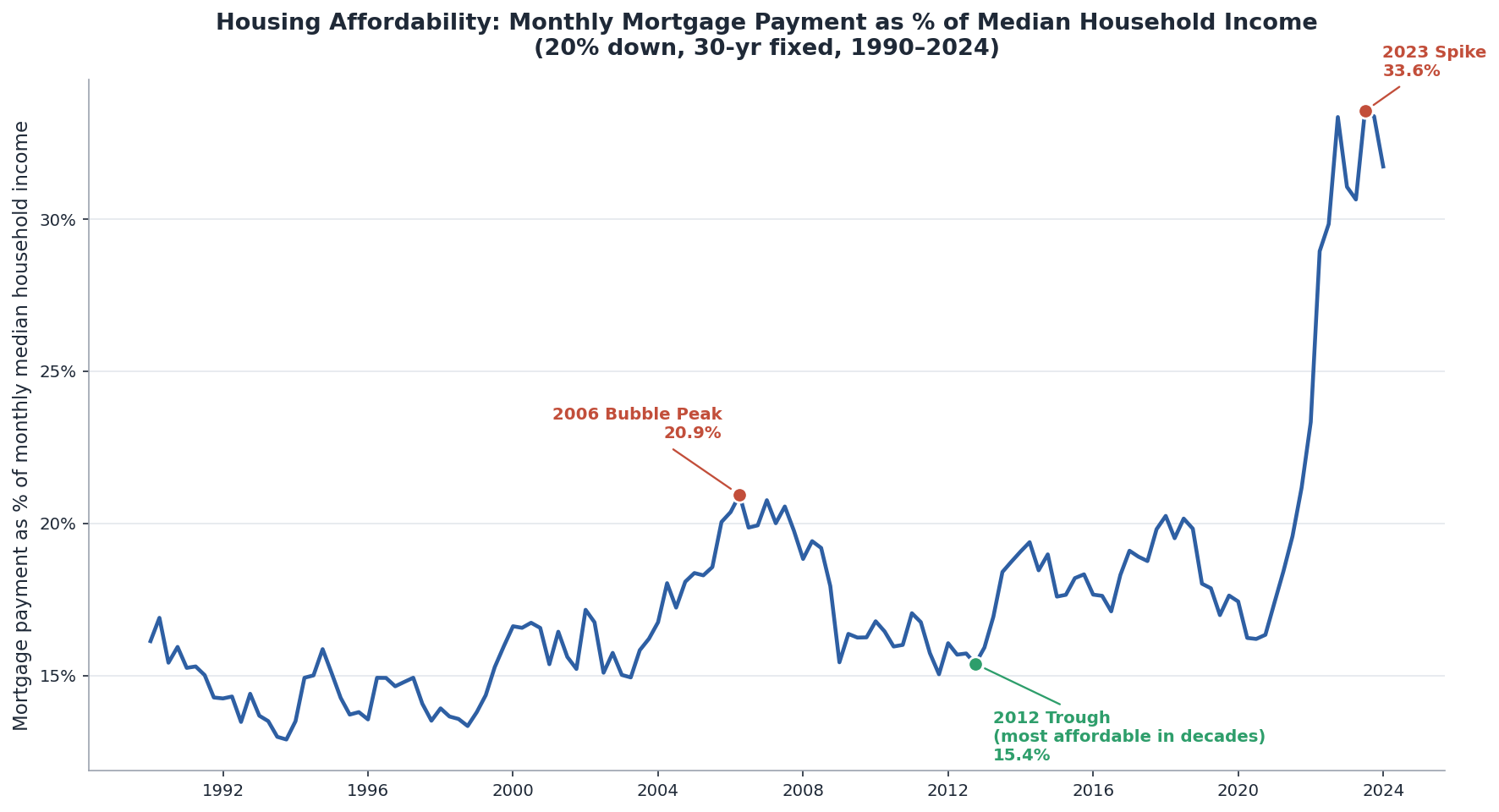
Download three FRED (Federal Reserve Economic Data) series as CSV: mortgage rate (MORTGAGE30US), home price (MSPUS), household income (MEHOINUSA672N), 1990 through most recent.
MORTGAGE30US is weekly — resample to quarterly by averaging. MSPUS is already quarterly. MEHOINUSA672N is annual — interpolate linearly between annual observations to produce quarterly values.
Assume a 20% down payment and a 30-year loan. Compute the monthly mortgage payment on a median-priced home and express it as a percentage of monthly median household income.
Plot the affordability ratio as a line chart. Annotate three points: the 2006 bubble peak, the 2012 trough (most affordable in decades, as low rates met depressed prices), and the 2023 spike.
Result
Reading, Editing, and Writing Documents
Claude natively reads text and images, and natively writes text. Everything beyond text is handled by code.
Document reading is doc -> text, then read
Document creation is text (code) -> doc
Office document editing is ‘read and write XML (Extensible Markup Language)’
Example
Get Tesla’s EPS from SEC EDGAR by quarter for the past 5 years. Plot. Create a PowerPoint deck with the plot plus discussion.
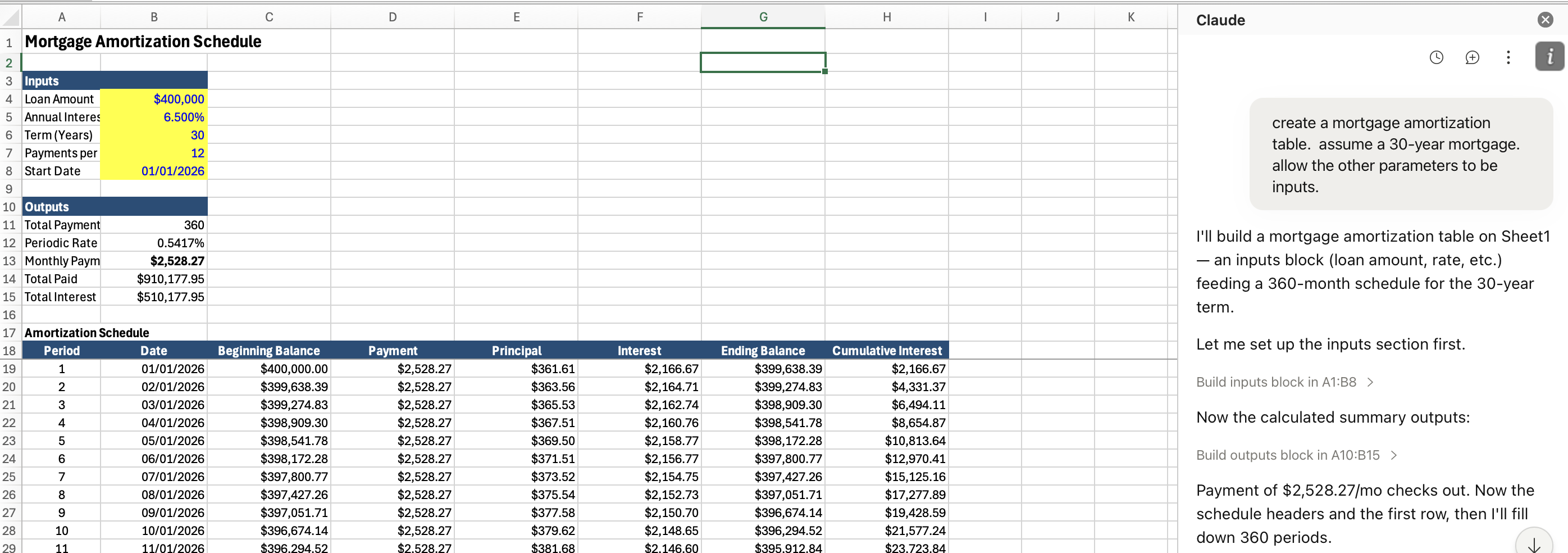
Claude uses Python to create Excel workbooks, inserting numbers (inputs) and formulas cell-by-cell
Example Prompt
Build an Excel workbook containing a mortgage amortization table. Include a chart of the amount going to interest and the amount going to principal each month.
A chat panel inside Excel itself. Add it from Home → Add-ins. You will be prompted to connect to your Anthropic account (paid account).
Example
Verifying Things
Verify Claims
The Problem
Facts, regulations, dates, citations — stated the same way whether real or invented
The more obscure the fact, the likelier it is fabricated
The Fix
Have it search before answering
Ask for sources. Then check them.
Verify Code
Consider a human assistant. Ask where they could have gone wrong.
They may not have understood what you wanted.
To perform the task, they may have had to make decisions that were different from the decisions you would have made.
Their Excel, code, or whatever may have had subtle bugs so it did not do what they expected.
Claude can go wrong in exactly the same ways. How do you check them?
Three Checks
Take advantage of the fact that AI is perfectly patient. You can probe more deeply than you would with a human assistant, and it will not be offended.
Check its understanding
Explain to me what you did and how you did it.
Check its decisions
Report all ways in which my instructions were ambiguous and you made decisions we have not discussed.
Check its code
Show me a sample case and work through the case as if by hand so I can verify your number.
Generator-Critic
Spawn a second Claude to attack the first one’s output, not validate it. Subagents work well — several of them.
The Pattern
Generator produces the work
Critic gets: “Find every factual error, logical gap, and unsupported assumption. Do not summarize — find flaws.”
Why a Separate Instance?
A model is anchored to its own output and defends it
A fresh instance with an adversarial mandate is not
Re-Use Tested Code
Once code runs correctly, save it. Re-use it rather than rewrite it.
The Problem with Rewriting
Different choices each time
Scripts that should agree may not
Old bugs reappear
Andrej Karpathy, OpenAI co-founder, former Tesla AI chief, now at Anthropic
October 2025
“They just don’t work. They don’t have enough intelligence, they’re not multimodal enough, they can’t do computer use and all this stuff. They don’t have continual learning. You can’t just tell them something and they’ll remember it.”
“I feel like the industry is making too big of a jump and is trying to pretend like this is amazing, and it’s not. It’s slop.”
December 2025
“I really am mostly programming in English now, a bit sheepishly telling the LLM what code to write… in words. Biggest change to my basic coding workflow in ~2 decades.”
February 2026
“It is hard to communicate how much programming has changed due to AI in the last 2 months: not gradually and over time in the ‘progress as usual’ way, but specifically this last December. Coding agents basically didn’t work before December.”
“I don’t think I’ve typed like a line of code probably since December.”
Examples of Claude Use
Some Local Data
Extract the following from session1.zip into your project folder or just put session1.zip there and tell Claude to extract.
I have five Northwind files in my project folder: customers, orders, order details, products, and categories. Which product categories generated the most revenue from customers in Germany and France? Show only categories above $10,000, sort highest to lowest, create a bar chart, and put it in a PowerPoint deck. Add some discussion.
Role of Excel
The first spreadsheet program, VisiCalc, was created by a Harvard MBA alum who was inspiried by watching his prof do pro-formas, valuation, and sensitivity analysis on a blackboard with chalk and eraser
Spreadsheets later became the go-to in business for most things numeric
Spreadsheets remain valuable for tabular add-subtract models
Everything else should be done by code written by AI
Example
Extract regression.html from session1.zip and double-click
It will open in your browser. Upload regression-example.xlsx into the browser.
Lessons
This was built by Claude from simple prompts.
It is even easier to just run one regression analysis.
Students learn as much about regression from prompting Claude as from running it in Excel.
Apps like this can be student assignments (more later).
Takeaways
There is no secret to prompting. Just chat (a lot). Treat AI as an infinitely patient colleague with a poor memory. Code execution gives AI enormous power.