2. Working with Claude
Faculty Workshop
Rice Business 2026
Workshop Overview
Today’s Session
1
Academic Studio
2
The Command Line
3
CLAUDE.md and Skills
4
Claude as an Assistant
5
PowerPoint
Academic Studio
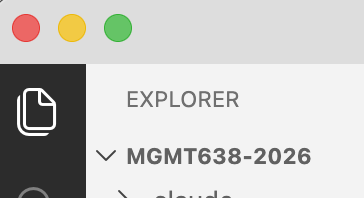
File Explorer and Search
Reach the File Explorer tool from the left toolbar.
Files
- Right-click to rename, copy, …
- Double-click to open in Academic Studio viewer
- Viewer provides different options for different file types (cannot edit Office docs)
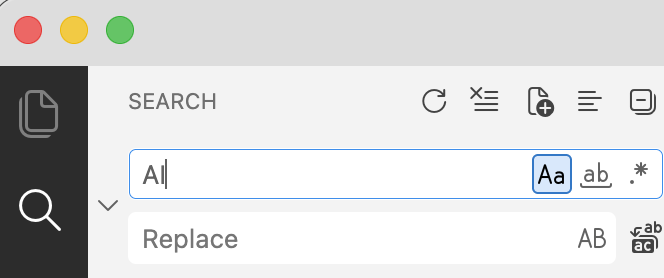
Search
- The magnifying glass searches inside every file in the folder at once
- Options for case, whole word, and regular expressions
- Replace across all files from the same pane
Useful Features
Claude icon on top right
- Open a new conversation
- Can run multiple conversations simultaneously
Extensions in left toolbar
- Many VS Codium extensions to choose from
- Some are pre-installed
Remote SSH in left toolbar
- Connect to jgsrc1 or a different remote server
- Files and code execution on remote server. Academic Studio runs on your computer.
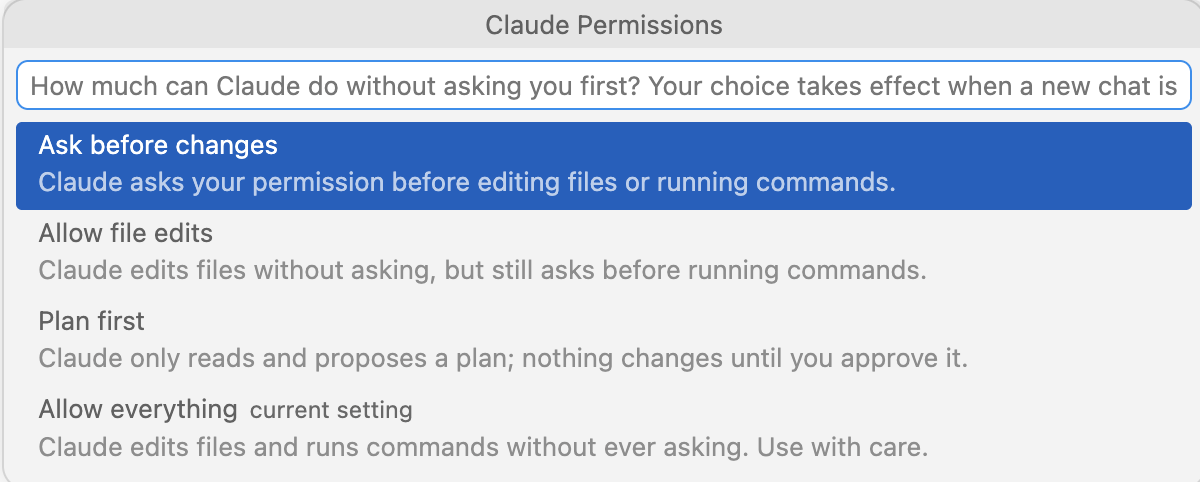
Permissions
Some Claude Commands
| Command | What it does |
|---|---|
| /resume | a version of Claude/Conversations |
| /model | select from Fable, Opus (default), Sonnet, and Haiku |
| /clear | clear the context window (= new conversation) |
| /compact | summarize the conversation in a text file, launch a new conversation that reads the text file |
| Esc | escape key interrupts Claude, which then waits for new instructions |
File View and Edit
- Extract and double-click files in session2.zip/sample_files
- Need different extensions installed for different filetypes (use Run Setup)
- Office docs are read only
- .py is a Python script, .ipynb is a Jupyter notebook
- .tex builds with ‘Play’ button, .qmd builds with Preview button
- .html toggles between editable text (HTML code) and browser-view with globe button
- .md toggles between editable text (Markdown code) and rendered view with pencil button
Fit with VS Code
- Independent apps, individual extensions and settings
- They share Claude — same CLAUDE.md, same skills, same conversation history
- Example: Work on project in Academic Studio. Then open in VS Code. /resume brings up conversation history from Academic Studio.
The Command Line
Using a Terminal (Command Line)
- Windows: Command Prompt, Windows PowerShell, Windows Terminal
- Mac Terminal
- Open. Then type commands. Syntax must be right (not intelligent)
What Claude Can Do at the Command Line
File operations
Move, copy, rename, delete, search within.
Find all files in my Documents folder that discuss … and move them to …
Install and run software
Run a python script, build a LaTeX doc, …
Interact with external services
Command Line Interfaces (CLIs): gh for GitHub, aws for Amazon Web Services, … Also, use APIs.
More Things Claude Can Do at the Command Line
pandoc — convert between Word, Markdown, HTML, PDF
ImageMagick — resize, crop, convert images in bulk
ffmpeg — trim video, transcode, pull the audio out
ripgrep — search thousands of files in seconds
cron — run a command on a schedule
Example: Git (Search the Past)
Git is a version control system. A commit records the current state of a folder (repository=repo). Git is not AI. Git existed long before AI. But AI knows Git.
Tell Claude
Install Git. Commit this folder to Git.
Frequently, thereafter, tell Claude to commit changes.
At some point, you realize that you want to recover something from a version that was overwritten sometime in the past:
Tell Claude
Find a prior version of … that said … Add that to the current version.
CLAUDE.md and Skills
CLAUDE.md
Where Claude Looks
- At the start of each conversation, Claude looks in specific places for CLAUDE.md files
- It looks in your home directory (C:\users\yourname on Windows) and it looks in the project folder
What It Is
- A CLAUDE.md is a text file that contains instructions for Claude
- Claude reads the entire file, so use it sparingly
You could get the same behavior by pasting the instructions in the prompt window
Skills
At Startup
At the start of each conversation, Claude also looks in specific places for SKILL.md files
Two Locations
It looks in your home directory (C:\users\yourname on Windows) and it looks in the project folder
Loaded on Demand
Skills are text files saved on your hard drive. Claude reads the top of each SKILL.md file on startup, and it reads the bulk of the file only when needed
Installing Skills
Where to Find Them
- There are thousands of skills published on the internet.
- Anthropic publishes skills (xlsx, etc.) at https://github.com/anthropics/skills/
Ask Claude
- To search for skills, ask Claude. To install a skill you want, ask Claude.
- Other than a few of Anthropic’s skills, the most useful skills are generally those you create, because they are customized to your work.
Example: xlsx Skill
The xlsx, docx, and pptx skills are created by Anthropic and come pre-installed with Claude Desktop
Some Other Examples
I’ve looked at several skill repos for business/economics research. Most are not useful. Here are a couple I’ve adopted — by Lu Han, Bank of Canada.
Econ Writing: tells Claude to follow Cochrane’s Writing Tips for PhD Students and some other style guides
Econ Paper Review: writes a referee report on your paper
Give Claude the links and ask Claude to install them if you want to try them out.
Creating Skills
1
Iterate
Usual process is you work on something, iterating until you get what you want.
2
Recognize
You realize you may want the same thing again, and you don’t want to go through the iteration again.
3
Save the Recipe
Solution: tell Claude to save the satisfactory method (recipe) as a skill. Can save your result along with the skill as an example to follow if useful.
Invoking Skills
Slash Command
- Type
/skillnameat the prompt - Example:
/plan - Invokes the skill directly
Natural Language
- Describe what you need in plain English
- Example: “Use your planning mode and evaluate …”
Automatic
- Claude may invoke a skill on its own
- Example: “Create an Excel file” triggers the xlsx skill automatically
- Driven by the skill’s description
Example: Create and Invoke
1
Create
Tell Claude to create a skill for your folder named “pirate” with this content: “Always answer like a pirate”
2
Invoke
Start a new conversation. Enter /pirate What is the meaning of life?
3
Inspect
Ask Claude to show you the pirate SKILL.md
Claude as an Assistant
What can Claude Do?
- Draft slides
- Assist with editing slides
- Generate images and tables for slides
- Do web research for slides
- Draft quizzes and assignments
- Assist with grading
- Draft emails to students
- Help create async materials
- Write cases
- Build tutors
PowerPoint Assistant
Using a Deck as a Template
Claude can read a deck, save images and other assets, and use them to create new decks in the same style. Here is an example.
- SamplePresentation.pptx is a Microsoft sample
- I asked Claude to remake tesla.pptx in that style
- The first draft: tesla1.pptx
- The second draft: tesla2.pptx
Create a Skill for PowerPoint
1
Save the Recipe
Once Claude has been successful at creating decks in your preferred style, ask Claude to save the recipe as a skill.
2
What Gets Saved
Claude will save images, layout guides, etc. from the doc you gave it along with the fonts that best match the doc (maybe not exact match) for reuse.
Isn’t This Just a PowerPoint Template?
Partly, yes — and a good skill does not replace the template.
What the Template Already Does
Fonts, colors, layouts, placeholder positions, the scenery. A designed .pptx is already a style kit.
A good skill uses it — filling that template’s own layouts instead of drawing shapes.
What the Skill Adds
- Which layout for which kind of content
- How much text fits in each placeholder
- What to do when nothing fits — a wide chart, a long table
A template guides a person, who sees the result and adjusts. A skill guides Claude, which cannot.
Claude in PowerPoint
In May, 2026, the Claude add-in for PowerPoint became generally available (for paid accounts). But I don’t think Rice has authorized it for our Microsoft 365 accounts.
The advantages would be (1) just one window open, (2) no save/close/reopen.
Tips for Your Skill
Save and close first
Include in your skill: Save and close any open PowerPoint deck before editing it. Re-open after editing.
Claude cannot see your slides
Claude cannot natively view PowerPoint slides to examine whether things are properly located. It goes PPTX → PDF → PNG.
The route matters
If left to its own devices, it may choose an inferior PPTX → PDF route (LibreOffice = open-source version of MS Office)
When Claude creates your skill, ask it about using AppleScript (Mac) or COM automation (Windows)
One More Tip
Sometimes multiple skills compete for the same job.
The collision
Anthropic’s pptx skill triggers on any PowerPoint file, so a skill of your own for your desired style will collide with it. Things compound if you create multiple skills for multiple styles.
The fix
Ask Claude to edit your CLAUDE.md to settle the precedence.
Exercises
Tell Claude to install Git and to initialize your project folder as a Git repo and to commit. Make some changes, commit again, and ask about restoring the prior version.
Pick a deck you want to refresh. Ask Claude to read it and offer suggestions on content, organization, and style. Ask Claude to edit some slides and to draft some slides, saving changes in a new name.
Create a skill for Claude to write slides in your desired style. Inspect the skill (if global, it is in $HOME/.claude/skills; if local, it is in your project folder .claude/skills)
Takeaways
Claude can work alongside you on whatever you’re working on. Get advice and suggestions. Hand over the tedious part of the work. Save good workflows as skills so they can be easily repeated.